
Edit Content
Technikgo.com

Technik Go LLC is professionals at web development, digital marketing, and IT consulting. Our modern designs, innovative tech solutions, and innovative marketing tactics will transform your online presence and optimize IT processes for outstanding efficiency.
Contact Info

The Ultimate Cloud Comparison: AWS vs. GCP vs. Azure (Deep Dive)

  1. Home
  2. »
  3. Cloud Services
  4. »
  5. The Ultimate Cloud Comparison: AWS vs. GCP vs. Azure (Deep Dive)
Icons for AWS, Azure, and Google Cloud above compute, storage, and networking symbols on a blue tech background

Choosing the right cloud can feel tricky – but don’t worry, we’ve made it simple. In this cloud comparison of AWS vs Azure vs GCP, we’ll explore how each platform performs in features, pricing, and AI tools. This easy-to-follow cloud computing comparison will help you find which cloud fits your business best – without the tech confusion.

Why This Cloud Comparison Matters

Choosing a cloud is a bit like choosing a car – you want the right balance of power, price, and features for your journey. Each platform – AWS, Azure, and GCP – offers great tools, but not all fit every business.

Here’s why your choice matters:

  • Cost control: A smart cloud cost comparison helps you avoid surprise bills and find better value.
  • Data & AI needs: Some clouds lead in analytics and cloud AI services, which can shape your business growth.
  • Integration & flexibility: The right cloud works smoothly with your apps, tools, and security systems.

Picking wisely today means fewer headaches and better results tomorrow. 

At a Glance: Main Strengths of AWS, Azure, and GCP

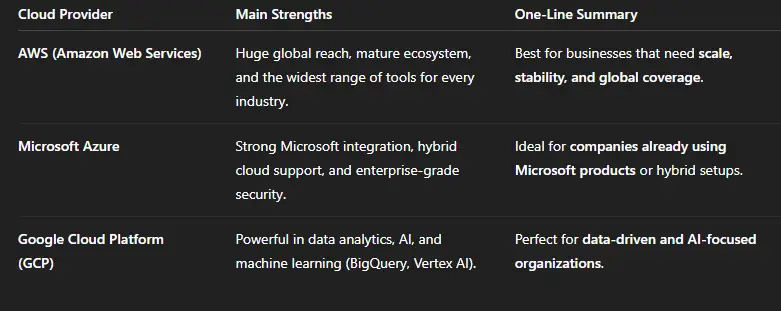
Before diving deep, here’s a quick look at what makes each major cloud platform special. Think of it as a snapshot of strengths – simple, clear, and helpful for quick comparison. 
Takeaway:
All three cloud providers are leaders – AWS for reach, Azure for integration, and GCP for innovation in AI and data. The best one depends on your goals and existing tools.

Deep Dive: Compute, Storage, Databases, AI & ML, Networking

When comparing AWS, Azure, and Google Cloud, the key is to look at their main building blocks – the tools that power every cloud setup. Here’s a clear breakdown of how they differ in core services.

Compute (Virtual Machines & App Hosting)

  • AWS: Uses EC2 (Elastic Compute Cloud) to let you run servers of any size.
  • Azure: Offers Virtual Machines and App Services for flexible scaling and easy Microsoft integration.
  • GCP: Provides Compute Engine, which is known for fast startup times and cost efficiency.
    Example: If you need massive, reliable server power, AWS leads. For Windows-based or hybrid setups, Azure shines. For startups focusing on automation and performance, GCP is great.

Storage (File, Object & Block Storage)

  • AWS: S3 (Simple Storage Service) is the industry standard for object storage – secure, scalable, and widely used.
  • Azure: Blob Storage offers strong backup options and seamless connection with Microsoft 365.
  • GCP: Cloud Storage is great for developers working with AI or data analytics.
    Example: If your goal is long-term backup and reliability, AWS S3 wins. Azure is best for enterprise files, while GCP suits data-heavy applications.

Databases (SQL, NoSQL & Analytics)

  • AWS: RDS and Redshift handle both everyday databases and analytics.
  • Azure: SQL Database and Synapse Analytics are designed for Microsoft ecosystems.
  • GCP: BigQuery is one of the fastest cloud analytics tools available.
    Example: For heavy data analytics, BigQuery vs Redshift vs Synapse often comes up – BigQuery wins for simplicity, Redshift for performance, and Synapse for deep Microsoft integration.

AI & Machine Learning (AIaaS Platforms)

  • AWS: SageMaker helps developers build, train, and deploy ML models quickly.
  • Azure: Azure AI integrates tools like Cognitive Services and OpenAI models.
  • GCP: Vertex AI is known for its data-centric design and built-in MLOps pipeline.
    Example: If you want AI tools that connect easily to data analytics, GCP takes the lead. For enterprise AI integration, Azure fits well, while AWS offers strong customization.

Networking (Speed & Connectivity)

  • AWS: Global backbone with Direct Connect for private high-speed links.
  • Azure: ExpressRoute provides private connections and hybrid cloud integration.
  • GCP: Cloud Interconnect focuses on low-latency global networking.
    Example: All three deliver strong networking. AWS offers the broadest reach, Azure suits hybrid users, and GCP provides reliable speed for global projects.

Takeaway:
Each cloud platform has its own sweet spot – AWS for scale, Azure for hybrid enterprises, and GCP for AI and analytics-driven businesses. Understanding these core areas helps you choose the best fit for your goals.

Pricing & Cost Signals (Simple Guide + What to Watch)

Cloud pricing can feel tricky, but the main idea is simple – you only pay for what you use. This model, called pay-as-you-go, is common across AWS, Azure, and GCP. It gives businesses flexibility and control without large upfront costs.

How Cloud Pricing Works (Plain Breakdown)

  • Pay-as-You-Go: You’re billed based on real usage – like how many hours your virtual machines run or how much data you store.
  • Committed Use Discounts: If you commit to using certain resources for a year or more, you get lower rates – great for stable workloads.
  • Sustained Use Discounts (mostly on GCP): The longer you use a service each month, the more discount you automatically receive – perfect for consistent apps or analytics jobs.

Illustrative Examples (No Hard Numbers)

A small web app hosting project might only need basic compute and storage, while a data analytics pipeline can cost more depending on query size and frequency.

Companies often start small, then optimize as they grow – that’s where cloud cost optimization and planning really matter.

Mini Cost Checklist – Watch These Triggers:

  •  Storage: Keep track of unused or duplicate backups.
  •  Egress: Moving data out of a cloud can add extra costs.
  •  Idle VMs: Shutting down unused virtual machines saves big over time.
  •  Monitoring Tools: Some services charge based on the volume of logs or metrics stored.
  •  Data Transfers Between Regions: Traffic between far-off regions can quietly raise your bill.

Even though all three – AWS, Azure, and GCP – offer competitive pricing, their models differ slightly. AWS provides flexibility, Azure favors enterprise packages, and GCP rewards long-term and efficient usage.

 Pro Tip: Use tools like CloudZero or native calculators from each provider to estimate your spend before you deploy anything.

If you want a custom estimate for your business or need help comparing models, contact Technik Go – we’ll review your setup and help you find the most cost-effective cloud plan.

AI & Data: Who Leads in ML, Analytics, and AIaaS?

Artificial Intelligence as a Service (AIaaS) means businesses can use advanced AI tools – like chatbots, analytics, and image recognition – without building complex systems from scratch. The big three clouds – AWS, Azure, and GCP – each offer unique strengths in AI, data, and machine learning (ML).

AWS – AI Powerhouse for Developers

Amazon Web Services brings strong AI tools like SageMaker for building ML models and Bedrock for using generative AI securely. AWS focuses on scalability and speed, making it ideal for businesses that want to quickly deploy AI into apps or automation systems.

Azure – Best for Enterprise AI & Integration

Microsoft Azure AI integrates smoothly with tools many businesses already use – like Office 365, Dynamics, and Power BI. Services such as Azure Cognitive Services and Azure Machine Learning make it easy to analyze images, process text, and build intelligent bots with built-in compliance and governance.

GCP – The Data & Analytics Leader

Google Cloud Platform (GCP) shines when it comes to data-driven AI. Tools like Vertex AI, BigQuery ML, and Looker Studio make analytics simple and powerful. GCP is especially strong in predictive analytics, marketing insights, and large-scale data training – backed by Google’s AI research and partnerships (like the Google-Meta AI collaboration, IT Pro+1).

Simple Use Cases

  •  Customer Insights: Businesses use BigQuery ML or Azure ML to predict buying trends and personalize experiences.
  •  Image Processing: Apps powered by AWS Rekognition or Azure Cognitive Vision help detect products, faces, or defects in real time.

In short, AWS leads in developer-focused AI tools, Azure wins with enterprise integration, and GCP dominates in data analytics and machine learning innovation.

 Takeaway: When choosing your AIaaS provider, think about your goals – scalability, enterprise fit, or data intelligence – and align your choice with that vision.

Security, Compliance & Enterprise Fit

When it comes to business safety and control, all three cloud giants – AWS, Azure, and Google Cloud – take security and compliance very seriously. But each has its own strengths that make it a better fit depending on your business type and setup.

  • AWS: Known for its broad security and compliance coverage, AWS supports hundreds of global standards like ISO, SOC, and GDPR. It’s a top choice for enterprises that need proven reliability and fine-grained access control across multiple industries.
  • Microsoft Azure: A natural fit for Microsoft-based enterprises, Azure offers seamless hybrid cloud support through services like Azure Arc and Active Directory. It’s popular among banks, healthcare, and government organizations that rely heavily on Microsoft tools.
  • Google Cloud Platform (GCP): Focuses strongly on data governance and encryption, using advanced tools like Confidential VMs and Zero Trust models. It’s ideal for companies that prioritize data security, analytics, and privacy by design.

 Recommendation: For regulated industries – such as finance, healthcare, or public services – Azure and AWS offer the deepest compliance coverage, while GCP shines in data protection and privacy innovation.

AWS – Broad Compliance & Global Coverage

Real Examples: 3 Micro Case Studies (SMB, Startup, Enterprise)

1. Small Business (E-commerce using AWS)

A small online store wanted faster page loading for global customers. They moved to AWS for its wide data center network and easy scaling. The result? 40% faster site speed and fewer checkout drop-offs during holiday sales.

2. Startup (AI analytics with Google Cloud)

A growing AI startup picked GCP because of BigQuery and Vertex AI. These tools helped them analyze customer data quickly without huge setup costs. They turned insights into better ad targeting, boosting conversions by 30% in three months.

3. Enterprise (Finance company using Azure)

A large finance firm chose Microsoft Azure to connect with its existing Office 365 and SQL systems. With Azure’s built-in compliance tools, they met financial data regulations easily and improved internal collaboration across teams worldwide.

Takeaway: Each cloud – AWS, Azure, or GCP – fits a different kind of business. The key is to match your size, budget, and goals with the platform’s strengths.

Simple Decision Checklist: Which Cloud Fits You?

Choosing between AWS, Azure, and Google Cloud (GCP) can feel tricky. Use this easy checklist to see which platform matches your needs best. Just answer “Yes” or “No” – and see where you fit.

  •  Do you already use Microsoft tools like Office 365, Teams, or Windows Server?
    → Go with Azure for smooth integration and a hybrid setup.
  •  Do you want to reach users around the world with low lag and fast performance?
    → Choose AWS, known for its huge global network.
  •  Do you work with big data, analytics, or AI models?
    → Pick GCP, built for smart data tools like BigQuery and Vertex AI.
  •  Do you want flexible pricing and scalability for growing apps or websites?
    → AWS offers strong scalability and multiple cost-saving options.
  •  Do you handle sensitive or regulated data (finance, healthcare, government)?
    → Azure gives strong compliance and hybrid control options.
  •  Do you want advanced machine learning or automation for insights?
    → GCP leads in AI-as-a-Service (AIaaS) and ML model deployment.
  •  Do you need a strong partner or migration support?
    → AWS and Azure both have large partner ecosystems and local experts.

Migration & Next Steps: What to Plan For

Once you’ve picked your cloud-AWS, Azure, or Google Cloud (GCP)-the next step is planning your migration. Moving to the cloud isn’t just about copying files; it’s about making sure your systems, apps, and data run smoothly and securely in their new home.

Simple Cloud Migration Checklist

  1. Assess your setup – List your current apps, databases, and storage needs. Decide what should move first.
  2. Plan your pilot – Start small. Test one app or service before moving everything.
  3. Migrate in stages – Move data and workloads step-by-step to reduce downtime.
  4. Secure everything – Enable encryption, IAM roles, and backup policies right away.
  5. Optimize performance – Use built-in tools to cut costs, monitor speed, and balance loads.

What to Expect During Migration

  • Timelines vary – small setups might take a few days, larger systems a few weeks.
  • Testing matters – always test apps, databases, and connections after migration.
  • Support helps – working with a cloud partner ensures a smooth, low-risk move.
Glossary (Quick Terms Explained)
  • IaaS (Infrastructure as a Service): You rent cloud servers and storage instead of owning hardware.
  • PaaS (Platform as a Service): The cloud gives you tools to build and run apps without managing servers.
  • SaaS (Software as a Service): Ready-to-use online software like Gmail, Zoom, or Salesforce.
  • AIaaS (AI as a Service): Cloud-based artificial intelligence tools you can use without deep coding skills.
  • BigQuery: Google Cloud’s fast tool for analyzing large amounts of data in seconds.
  • RDS (Relational Database Service): AWS’s managed database system that handles backups and scaling.
  • VM (Virtual Machine): A computer running inside another computer – used for flexible cloud computing.
  • API (Application Programming Interface): A digital bridge that lets apps and systems talk to each other.

Need Help Choosing Your Cloud?

Not sure whether AWS, Azure, or GCP fits your business best?
Our experts at Technik Go make it simple. Get a free cloud readiness check and personalized guidance to choose, plan, and migrate the right way.

Frequently Asked Questions

Q1. Which cloud is better – AWS, Azure, or GCP?

It depends on what you need. AWS is best for global reach and variety, Azure fits Microsoft users perfectly, and GCP leads in data and AI innovation.

Q2. What are the big three cloud providers?

The top three cloud providers are Amazon Web Services (AWS), Microsoft Azure, and Google Cloud Platform (GCP). Together, they power most of the world’s cloud systems.

Q3. Which cloud is the cheapest?

There’s no single cheapest provider. AWS, Azure, and GCP all offer pay-as-you-go pricing and discounts for long-term use. Costs depend on your storage, compute time, and usage patterns.

Q4. Which cloud is best for AI and machine learning?

Google Cloud (GCP) is known for powerful AI tools like Vertex AI and BigQuery ML. AWS SageMaker and Azure AI are also strong for training and deploying models at scale.

Q5. Can I use more than one cloud provider?

Yes, that’s called a multi-cloud strategy. Many companies use AWS for hosting, Azure for Microsoft apps, and GCP for analytics-all working together.

Q6. Who is AWS’s biggest competitor?

Microsoft Azure is currently AWS’s biggest competitor, with Google Cloud quickly catching up thanks to its growing AI and data capabilities.